- AMD Ryzen 9 7950X
2 Dedicated Threads @ 5.7GHz - DDR5 RAM
4GB (Guaranteed) - NVMe SSD
35GB Storage - Game Slots
Set the game slots yourself - DDOS PROTECTION
Included
- AMD Ryzen 9 7950X
2 High-Performance Logical Cores - Perfect for Co-op - RAM DDR5
6GB (Guaranteed) - NVMe SSD Storage
40GB Blazing-Fast - Game Slots
Set the game slots yourself - DDOS PROTECTION
Included
- AMD Ryzen 9 7950X
3 High-Performance Logical Cores - Top-Tier Power - RAM DDR5
8GB (Guaranteed) - NVMe SSD Storage
60GB Blazing-Fast - Game Slots
Set the game slots yourself - DDOS PROTECTION
Included
- AMD Ryzen 9 7950X
4 Dedicated Threads @ 5.7GHz - DDR5 RAM
12GB (Guaranteed) - NVMe SSD
80GB Storage - Game Slots
Unlimited player slots - DDOS PROTECTION
Included
- AMD Ryzen 9 7950X
6 High-Performance Logical Cores - Power for Demanding Scenarios - RAM DDR5
16 GB (Guaranteed) - NVMe SSD Storage
100GB Blazing-Fast - Game Slots
Set the game slots yourself - DDOS PROTECTION
Included
- AMD Ryzen 9 7950X
8 High-Performance Logical Cores - Uncompromising Power - RAM DDR5
24GB (Guaranteed) - NVMe SSD Storage
120GB Blazing-Fast - Game Slots
Unlimited player slots - DDOS PROTECTION
Included
Arma 3 Game Panel Sneak Peek
Our Arma 3 game panel is based on pterodactyl and will come with power packed features.

Easy Arma 3 server Configuration
Our Arma 3 game panel is easy to use. With full control of your server and game files.

Automated Arma 3 Server Backups
You can configure Arma 3 server backups straight from the panel and download the backups anytime you want. Now data loss will be a thing of the past.

Custom Panel
MYSQL databases, invite users, create schedules such as auto restart to help with Arma 3 memory leak issue, Mod Manager and much more
Get the Best Performance for Your Arma 3 Server Hosting
Experience the hosting your project deserves with our cutting-edge, high-frequency hardware, meticulously optimized for Arma 3. We guarantee unparalleled performance through our strict no-overload, no-oversell policy. Our unique transparency protocol puts you in control, providing real-time access to core server metrics. Stop wondering about your server's capabilities - with us, peak performance isn't just promised, it's proven.
-
Game Switcher
-
Powerful Hardware
-
Sub-Users and complete control
-
DDoS Protection
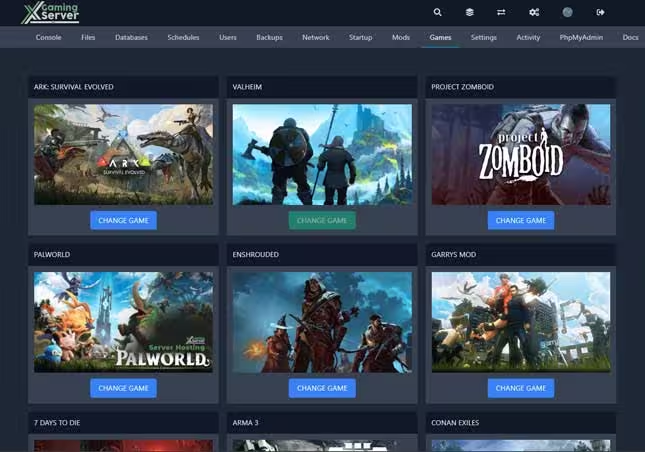
Flexibility: XGamingServer provides a game switching feature, allowing you to switch between different games hosted on the same server. This means you can easily switch from Arma 3 to another supported game without needing a separate server.
Cost-Effective: This feature maximizes the use of your server resources and offers cost savings by eliminating the need to purchase multiple servers for different games.
Seamless Transition: The process of switching games is designed to be seamless and straightforward, ensuring minimal downtime and disruption. Your server settings and files are preserved, so you can jump back anytime.
Experience unrivaled performance with our state-of-the-art, high-frequency hardware specifically optimized for Arma 3 servers. Our infrastructure is engineered to prevent overloads and overselling, delivering consistent and dependable performance.
We offer dedicated physical resources exclusively for your use, not just a shared pool of servers with slot restrictions. This guarantees your server remains unencumbered. With complete access to core server metrics, you can track performance as it happens. Hardware Specifications: AMD Ryzen 9 7950X @ 5.7GHz / 128GB DDR5 RAM / 1TB NVMe SSDs / Network Capacity: Premium 1Gbps
Collaborative Server Management with Instant File Access Empower your team and streamline server administration with our comprehensive management tools. Invite trusted individuals - friends, developers, and staff members - to access your server console, allowing them to restart the server and configure files as needed. This collaborative approach distributes responsibilities, ensures smoother operations, and reduces the burden of solo server management while maintaining your control over permission levels.
Experience unparalleled convenience with our built-in file management system, eliminating the need for time-consuming SFTP programs. Add, delete, and edit files directly on your server through our intuitive interface. Whether you're tweaking a config file, updating server rules, or implementing new mods, you can make real-time changes from one centralized dashboard.
To combat the frequent DDoS attacks targeting the online gaming and eSport sectors, hosting platforms need robust protection for server IP addresses. These attacks, often exploiting UDP protocols, can severely disrupt gaming services.
Our service offers always-on, high-speed protection tailored to gaming applications, distinguishing legitimate players from attackers. Utilizing advanced traffic analysis and specialized hardware, our solution ensures game quality by filtering both incoming and outgoing traffic, effectively mitigating threats at both the network and application layers. This custom protection, developed through extensive research and testing, adapts to various games and communication modules to ensure optimal security.
Our datacenters are located in 5 regions
Global coverage our game servers are located in East and West Coast North America, Europe, Singapore and Australia getting you a Arma 3 server rental closest to you with minimal ping

6 Global Datacenters in East and West Coast North America, Canada, Europe, Singapore and Australia
This ensures you always receive the best ping for a smooth, and fast gaming experience.
- East Coast USA-NYC/Miami/Montreal
- West Coast USA-Los Angeles
- Europe-Germany
- Oceania-Australia/New Zealand
- Singapore
How do I set up Arma 3 dedicated server?
We will show you how Xgamingserver makes it easier for you to set up an Arma 3 server without the many configurations and technical knowhow
-
Installation of Arma 3 Server with our Game Panel
-
Installation of Arma 3 Server on a VPS
Step 1: Enter your details Select your plan size and region
Step 2: Purchase a server
Step 3: Launch your Server and enjoy
Hosting an Arma 3 Server on a VPS without XGamingServer Panel
Hosting your own Arma 3 server on a Virtual Private Server (VPS) offers unparalleled control over your gaming environment, allowing you to customize game modes, control player access, and much more. This guide walks you through the process of setting up your own Arma 3 server, ensuring you have everything you need for an optimized and enjoyable multiplayer experience.
Before you begin, ensure you have access to a VPS with Ubuntu or a similar Linux distribution installed. You will also need root access or privileges to execute commands via sudo. Familiarity with the command line interface (CLI) is beneficial but not necessary, as this guide provides step-by-step instructions.
Step 1: Connect to Your Server
ssh your_username@your_vps_ipStep 2: Install SteamCMD
sudo apt update && sudo apt upgrade -y
                    sudo apt install lib32gcc-s1 lib32stdc++6 curl wget net-tools screen ufw -y
                    mkdir ~/steamcmd && cd ~/steamcmd
                    wget https://steamcdn-a.akamaihd.net/client/installer/steamcmd_linux.tar.gz
                    tar -xvzf steamcmd_linux.tar.gz
Step 3: Install the Arma 3 Server using SteamCMD
./steamcmd.sh
                    login anonymous
                    force_install_dir ~/arma3-server
                    app_update 233780 validate
                    quit
Step 4: Configure Firewall Rules
sudo ufw allow ssh
                    sudo ufw allow 2302:2306/udp
                    sudo ufw allow 2344/udp
                    sudo ufw allow 2345/udp
                    sudo ufw enable
Step 5: Configure Arma 3 Server
Create a server.cfg file in your server directory:
nano ~/arma3-server/server.cfgAdd the following configuration:
// Server name displayed in browser
hostname = "Your Arma 3 Server";

// Server password (leave empty for public)
password = "";

// Admin password for remote admin
passwordAdmin = "YourAdminPassword";

// Maximum players
maxPlayers = 64;

// Voting settings
voteMissionPlayers = 1;
voteThreshold = 0.33;

// Security
BattlEye = 1;
verifySignatures = 2;

// Performance
MaxMsgSend = 128;
MaxSizeGuaranteed = 512;
MaxSizeNonguaranteed = 256;
MinBandwidth = 131072;
MaxBandwidth = 10000000000;

// Mission rotation
class Missions {
    class Mission1 {
        template = "MP_Coop_m01.Altis";
        difficulty = "Regular";
    };
};
Step 6: Create Startup Script
Create a startup script for better server management:
nano ~/start-arma-server.shAdd the following content:
#!/bin/bash
cd ~/arma3-server
screen -dmS arma3 ./arma3server -name=server -config=server.cfg -port=2302
echo "Arma 3 server started in screen session. To view, use: screen -r arma3"
Make the script executable:
chmod +x ~/start-arma-server.shStep 7: Start Your Server
~/start-arma-server.shStep 8: Connect to Your Arma 3 Server
To join your server, launch Arma 3 through Steam, navigate to the Multiplayer menu, and click "Direct Connect". Enter your server's IP address and port 2302. You can also find your server in the Server Browser if it's set to be visible.
Enhancing Your Server
Consider adding popular mods from Steam Workshop like ACE3, TFAR, or RHS to enhance gameplay. You can also install custom missions, configure headless clients for AI processing, and set up script-based anti-cheat systems.
Server Maintenance
Remember to regularly update your server with:
cd ~/steamcmd
./steamcmd.sh +login anonymous +force_install_dir ~/arma3-server +app_update 233780 validate +quitSetting up an Arma 3 server on a VPS might seem daunting at first, but by following these detailed steps, you can create a robust, customizable gaming environment that meets your specific needs. Whether you're running large-scale battles or intimate co-op sessions, a well-configured server provides the foundation for an excellent gaming experience.
Why Choose XGamingServer for Arma 3 Game Server Hosting
Below are some of the things that shows why you should choose us for your Arma 3 hosting

Around the clock Support for Arma 3
We respond to tickets in good record times, and we help and much as we can to solve your issues.

Extensive Arma 3 Documentation
Our documentation will already get you up and running with Arma 3 servers. From basics to advance server configurations.

Instant Activation
Arma 3 servers comes online within minutes of placing an order. This means you start playing instantly.

Top of the line hardware
Our servers are hosted on the best latest Ryzen and intel CPUs with NVMe SSD and on a Bandwidth of 1Gbps. Giving you the best Arma 3 server hosting and gaming experience.

Multiple Location
Our Arma 3 game servers are located in East and West Coast North America, Europe, Singapore and Australia. We ensure you get the server with the lowest ping.
Custom Control Panel
Our control panel is fully customized to ensure easy and fully customization of your game server.
About Arma 3
What is Arma 3?
Arma 3 is the gold standard of military simulation on PC, developed by Bohemia Interactive. Set on the vast Mediterranean islands of Altis and Stratis — spanning over 290 square kilometers of open-world terrain — Arma 3 delivers the most authentic combined-arms warfare experience available in gaming. From infantry tactics and armored vehicles to helicopter insertions and naval operations, Arma 3 provides an unmatched sandbox for military enthusiasts, milsim communities, and casual players alike.
Game Modes and Community Content
What truly sets Arma 3 apart is its thriving modding community and diverse game modes. The Steam Workshop hosts thousands of mods, missions, and total conversions. Popular community game modes include Altis Life (roleplay), Exile (survival), King of the Hill (competitive PvP), Epoch (survival sandbox), Wasteland (faction warfare), and countless custom military simulation (milsim) operations. Zeus Game Master mode lets one player act as a real-time mission director, creating dynamic scenarios for other players on the fly.
Why Host Your Own Arma 3 Server?
Running your own Arma 3 dedicated server gives you complete control over your community's experience. Configure mission rotations, manage mod collections, set difficulty and AI behavior, control player access with passwords and admin tools, and run headless clients for improved AI performance on larger operations. With XGamingServer's AMD Ryzen 9 7950X hardware, your server can handle heavy mod loads, large player counts, and complex AI scenarios without performance drops.
Expansions and DLC
Arma 3 includes the Apex expansion (featuring the jungle island of Tanoa and a cooperative campaign), the Contact expansion (alien encounter storyline), and numerous DLC packs adding helicopters, marksman rifles, jets, tanks, and laws of war content. All expansion maps and content are fully supported on our hosted servers, letting your community explore every aspect of what Arma 3 has to offer.
What other Arma 3 gamers are saying
Here is just a snippet on what our customers are saying about our Arma 3 hosting on Trustpilot

Gox
Hardcore Gamer

Nos fx
Canadian Gamer

Rory Mace
Australian Gamer

Setup Guides & Documentation on Arma 3
Step-by-step server guides from our official documentation.
How to Connect to Your Server
Read Guide
How to Configure Your Server
Read Guide
Frequently Asked Questions About Arma 3 Hosting
Below are some of the FAQs that our customers ask. If you have any further questions, please feel free to reach out.
- Arma 3 dedicated servers support up to 128 or more concurrent players, though the practical limit depends heavily on mission complexity, AI count, and scripting quality. A small co-op group of 4-20 players runs comfortably on modest hardware, while large-scale King of the Hill or milsim operations with 64-128 players demand dedicated CPU cores and 8GB+ RAM.
- The key bottleneck is server FPS (simulation cycles per second), which drops as AI units and complex scripts increase. Connecting one or more Headless Clients to offload AI processing is standard practice for high-population servers, letting the main server focus on player simulation and network traffic.
- Altis: 270 km² Mediterranean island - one of the largest maps in any first-person shooter, featuring cities, airfields, salt flats, and rugged coastline.
- Stratis: 20 km² smaller island ideal for infantry-focused missions and smaller player counts.
- Malden: 62 km² free DLC terrain remastered from the original Operation Flashpoint.
- Tanoa (Apex DLC): 100 km² jungle archipelago with dense vegetation, perfect for CSAT vs. NATO Pacific scenarios.
- Livonia (Contact DLC): 163 km² Eastern European forest and farmland with distinct autumn atmosphere.
- Community maps: Thousands of custom terrains on Steam Workshop ranging from desert environments to dense urban cityscapes, all installable via your server's mod configuration.
- Arma 3 loads server-side mods through the -mod= startup parameter, which accepts a semicolon-separated list of mod folder paths. Mods are downloaded from Steam Workshop and placed into the server directory. Each mod includes .bikey signature files that must be copied to the server's Keys folder so clients running those mods can connect.
- CBA_A3 (Community Base Addons) is the foundation dependency required by most other mods.
- ACE3 adds advanced medical simulation, realistic ballistics, and vehicle interaction systems.
- TFAR (Task Force Arrowhead Radio) and ACRE2 provide positional radio communications integrated with TeamSpeak.
- RHS and CUP add real-world military vehicles, weapons, and uniforms from NATO and Russian forces.
- server.cfg: The primary configuration file controlling server name, passwords, admin password, voting thresholds, mission rotation, kick/ban rules, and BattlEye anti-cheat toggle.
- basic.cfg: Handles network bandwidth tuning with settings like MinBandwidth, MaxBandwidth, MaxMsgSend, MaxSizeGuaranteed, and MinErrorToSend - critical for optimizing performance on high-population servers.
- Server profile (.Arma3Profile): Controls gameplay difficulty using four presets (Recruit, Regular, Veteran, Custom) and granular settings including viewDistance, terrainGrid resolution, and individual AI sub-skills like aimingAccuracy, aimingShake, spotDistance, and commanding.
- All three files are plain text and can be edited through your game panel or directly via file manager.
- A Headless Client (HC) is a special Arma 3 instance that connects to your server without rendering any graphics, dedicating its entire process to AI calculations. Since Arma 3's Real Virtuality engine processes AI largely on a single thread, missions with dozens of AI units can severely drop server FPS.
- By offloading AI groups to one or more Headless Clients, you distribute this workload across additional CPU cores. Mission scripts need to detect the HC using the hasInterface and headlessClient commands, then transfer AI group ownership accordingly.
- This setup is standard practice for milsim units running operations with 40+ AI units alongside human players, and is the difference between a smooth 40+ server FPS and an unplayable slideshow.
- Zeus: A real-time game master places units, triggers, and objectives on the fly while players experience the mission live - the ultimate dynamic storytelling tool.
- King of the Hill: Three-faction large-scale territory control supporting 100+ players with infantry, armored, and air combat.
- Antistasi: Persistent guerrilla campaign where players build a resistance movement against occupying forces, with save states between sessions.
- Liberation: Cooperative territory capture across the entire map with logistics, FOB construction, and resource management.
- Exile & Wasteland: PvP survival modes featuring base building, looting, and player-driven economies.
- Invade & Annex: Co-op sector clearing with role-based classes and support assets.
- Custom missions: The included Eden Editor lets anyone build scenarios using SQF scripting, with thousands of community missions available on Steam Workshop.
- Port 2302 (UDP): Primary game traffic - all player connections and gameplay data flow through this port.
- Port 2303 (UDP): Steam query protocol - this is how the server browser discovers and displays your server's information.
- Port 2304 (UDP): Steam master server communication for server list registration.
- Port 2306 (UDP): BattlEye anti-cheat traffic, required when BattlEye is enabled (recommended for public servers).
- All ports must be open in your firewall for the server to be publicly accessible. When running multiple Arma 3 server instances on the same machine, offset each instance by 10 (e.g., second server on 2312, 2313, 2314, 2316).
- A vanilla Arma 3 server with under 30 players typically uses 2-4GB RAM. Adding popular mod sets like ACE3, RHS, and CUP pushes usage to 4-8GB. Large milsim operations with 64+ players, multiple Headless Clients, and heavy mod packs can exceed 8GB.
- However, RAM is rarely the primary bottleneck in Arma 3. Server performance depends more on single-thread CPU speed because the Real Virtuality engine is largely single-threaded. A fast single-core clock speed matters far more than having many cores.
- NVMe SSD storage also makes a noticeable difference for map loading times and mission file access, especially on heavily modded servers where total mod data can reach 30-50GB.