
- AMD Ryzen 9 7950X
2 High-Performance Logical Cores - Perfect for Small Clans - RAM DDR5
4GB (Guaranteed) - NVMe SSD Storage
30GB Blazing-Fast - Player Slots
Up to 10 players - DDOS PROTECTION
Included
- AMD Ryzen 9 7950X
3 High-Performance Logical Cores - Great for Medium Clans - RAM DDR5
6GB (Guaranteed) - NVMe SSD Storage
50GB Blazing-Fast - Player Slots
Up to 10 players - DDOS PROTECTION
Included
- AMD Ryzen 9 7950X
4 High-Performance Logical Cores - Perfect for Large Castles - RAM DDR5
8GB (Guaranteed) - NVMe SSD Storage
70GB Blazing-Fast - Player Slots
Up to 20 players - DDOS PROTECTION
Included
- AMD Ryzen 9 7950X
6 High-Performance Logical Cores - Epic Castle Sieges - RAM DDR5
12 GB (Guaranteed) - NVMe SSD Storage
90GB Blazing-Fast - Player Slots
Up to 30 players - DDOS PROTECTION
Included
- AMD Ryzen 9 7950X
8 High-Performance Logical Cores - Industrial Scale Operations - RAM DDR5
16GB (Guaranteed) - NVMe SSD Storage
120GB Blazing-Fast - Player Slots
Up to 50 players - DDOS PROTECTION
Included
Best Renown Server Hosting Comparison 2025
Compare XGamingServer with top competitors
| Provider | Starting Price | CPU Performance | Setup Time | Mod Support | Bohemia Compliant | Rating |
|---|---|---|---|---|---|---|
| 🏆 XGamingServer | $10.50/mo | AMD Ryzen 9 7950X @ 5.7GHz 40% faster than Xeon |
60 seconds Automated deployment |
✅ Full Support Automatic Sync |
✅ Certified Official guidelines |
4.8/5 ⭐ 1,250 reviews |
| Host Havoc | $20.00/mo 90% more expensive |
Intel Xeon E-2288G @ 3.2GHz Older generation |
5-10 minutes Manual setup |
✅ Yes Mod Support |
🔸 Standard Basic compliance |
4.8/5 ⭐ 1,453 reviews |
| Nitrado | $24.99/mo 137% more expensive |
Various CPUs Inconsistent performance |
Instant Template-based |
✅ Yes Mod Support |
🔸 Standard Basic compliance |
4.5/5 ⭐ 4,406 reviews |
| G-Portal | $23.51/mo 124% more expensive |
Intel Xeon Older architecture |
Instant Basic setup |
✅ Yes Mod Support |
🔸 Standard Minimum requirements |
4.1/5 ⭐ 2,377 reviews |
| GTX Gaming | $22.00/mo 109% more expensive |
Intel Xeon Unknown specs |
5-15 minutes Slower deployment |
✅ Yes Mod Support |
🔸 Standard Basic setup |
4.3/5 ⭐ Limited reviews |
💰 Unbeatable Pricing
Starting at $10.50/month - that's 47-137% cheaper than Host Havoc, Nitrado, or G-Portal. Get premium AMD Ryzen 9 performance for less than basic Xeon hosting elsewhere.
🚀 Superior Hardware
Exclusive AMD Ryzen 9 7950X @ 5.7GHz processors deliver 40% better performance than competitors' outdated Intel Xeon systems. Your players experience zero lag.
⚡ Lightning Setup
60-second deployment with full Full mod support ready. While competitors take 5-15 minutes, you're already playing.
Renown Server Hosting Panel
Our Renown server hosting panel is based on pterodactyl and will come with power packed features.

Easy Renown Server Hosting Configuration
Our Renown server hosting panel is easy to use. With full control of your server and game files.

Automated Renown Server Hosting Backups
You can configure Renown server hosting backups straight from the panel and download the backups anytime you want. Now data loss will be a thing of the past.

Custom Panel
MYSQL databases, invite users, create schedules such as auto restart to help with Renown performance optimization, Mod Manager and much more
How to Setup Your Renown Server Hosting in 2025
Two options: Rent for instant setup or self-host (advanced)
| Setup Method RECOMMENDED | Requirements | Features & Support |
|---|---|---|
|
Rent from XGamingServer
95% of customers choose this
|
No technical knowledge Just payment & setup 60-second deployment |
AMD Ryzen 9 7950X @ 5.7GHz 24/7 Expert Support Auto-updates & backups |
|
Self-Host (Advanced)
Technical knowledge required
|
6+ core CPU @ 4.0GHz+ 16GB+ DDR4 RAM Static IP & port forwarding |
No technical support Manual maintenance Hardware costs $100-200/mo |
| Start Now - $10.50/mo | View Self-Host Guide | Compare Features |
Option 1: XGamingServer Process
- Choose Your Plan: Select from our AMD Ryzen 9 powered packages
- Instant Activation: Server deploys automatically within 60 seconds
- Configure Settings: Use our custom control panel for easy setup
- Invite Players: Share server details with your clan members
- 24/7 Support: Our experts help with setup and technical issues
Option 2: Self-Host Process
- Download Files: Get "Renown Dedicated Server" from Steam
- Edit config.json: Configure server name, password, max players
- Port Forwarding: Open UDP ports 2001, 17777 on your router
- Launch Server: Run ArmaReforgerServer.exe with parameters
- Maintenance: Handle updates, backups, monitoring 24/7
Renown Server Requirements Comparison
| Component | Minimum (20 players) | Recommended (60 players) | Our Servers Provide |
|---|---|---|---|
| CPU | 4 Cores @ 3.0GHz | 6 Cores @ 4.0GHz | AMD Ryzen 9 7950X @ 5.7GHz |
| RAM | 8GB DDR4 | 16GB DDR4 | Up to 24GB DDR5 |
| Storage | 50GB HDD | 100GB SSD | 120GB NVMe SSD (3x faster) |
| Network | 100 Mbps | 500 Mbps | 10 Gbps Enterprise |
| Monthly Cost | ~$50-100 (self-hosting) | ~$100-200 (self-hosting) | From $10.50/month |
Why spend hundreds on hardware when you can get better performance for $10.50/month?
Get Superior Performance - 30% OFFAdvanced Renown Server Hosting Configuration
Based on official Renown documentation - Pre-configured on all XGamingServer plans
Server Configuration Files
default.ini Structure:
[ServerSettings]
ServerName=Your Renown Server
ServerVisible=true
ServerPassword=
StartLocalHost=true
GamePort=27015
UpdatePort=27016
ServerMaxPlayers=10
Autosave=true
SaveInterval=300
UPNPEnabled=false
LocalIpAddress=0.0.0.0

[WorldSettings]
WorldType=Moon
WorldSeed=12345
Difficulty=Normal
TradingEnabled=true
XGamingServer Advantage:
- ✅ Pre-configured - No INI editing required
- ✅ Web Interface - Change settings via control panel
- ✅ Auto-backup - Save files backed up automatically
- ✅ World Selection - Easy planet/moon switching
Network & Port Configuration
Required Ports:
| Protocol | Port | Purpose |
|---|---|---|
| UDP | 27015 | Game Traffic |
| UDP | 27016 | Query Port |
| TCP | 27015 | Mod Support |
Cross-Platform Support
Note: mod support are automatically synchronized between server and clients.
BattlEye Anti-Cheat
Automatically configured and enabled. Our servers include BattlEye protection without additional setup required.
Mod Support
Full mod support with automatic mod installation and updates. One-click mod installation through our panel.
Startup Parameters
Advanced parameters like -config, -profile, and -logLevel
are pre-configured for optimal performance.
Renown Technical Specifications
Official Bohemia Interactive server requirements and our optimized solutions
| Server Components OPTIMIZED | Network & Ports | Platform Support |
|---|---|---|
|
AMD Ryzen 9 7950X @ 5.7GHz
|
UDP Port 2001 (Game Traffic) UDP Port 17777 (Steam A2S) |
PC (Steam) Steam PC Only |
|
Up to 24GB DDR5 RAM
|
DDoS Protection Included 10 Gbps Enterprise Network |
Mod Support Up to 64 Players |
|
120GB NVMe SSD Storage
|
BattlEye Anti-Cheat RCON Support (Optional) |
Mod Support Mods Custom Scenarios |
| Get Optimized Server | Network Details | Platform Features |
Based on Official Bohemia Interactive Documentation
All configurations follow the official Renown server hosting guidelines from community.bistudio.com. Our servers are tested and optimized according to Bohemia's recommendations.
Skip the Technical Setup
Why spend hours configuring when our experts have already done it? Get a professionally configured server in 60 seconds.
Get Pre-Configured Server - $10.50/monthGet the Best Performance for Your Renown Server Hosting Hosting
Experience the hosting your project deserves with our cutting-edge, high-frequency hardware, meticulously optimized for Renown. We guarantee unparalleled performance through our strict no-overload, no-oversell policy. Our unique transparency protocol puts you in control, providing real-time access to core server metrics. Stop wondering about your server's capabilities - with us, peak performance isn't just promised, it's proven.
-
Game Switcher
-
Powerful Hardware
-
Sub-Users and complete control
-
DDoS Protection
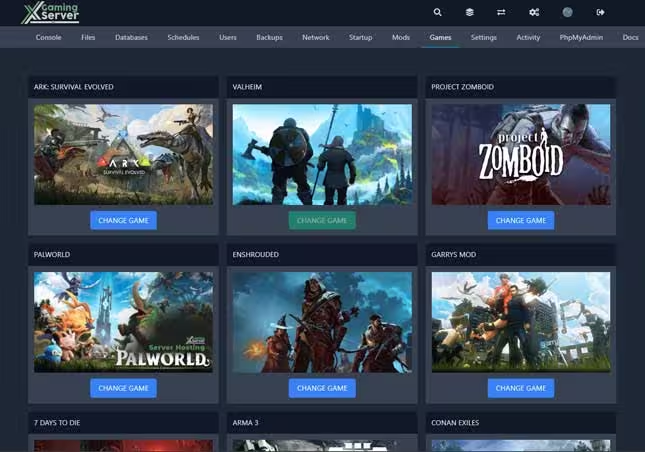
Flexibility: XGamingServer provides a game switching feature, allowing you to switch between different games hosted on the same server. This means you can easily switch from Renown to another supported game without needing a separate server.
Cost-Effective: This feature maximizes the use of your server resources and offers cost savings by eliminating the need to purchase multiple servers for different games.
Seamless Transition: The process of switching games is designed to be seamless and straightforward, ensuring minimal downtime and disruption." heading and content make it 3 paragraphs text size "But I must explain to you how all this mistaken idea of denouncing pleasure and praising pain was born and I will.
Experience unrivaled performance with our state-of-the-art, high-frequency hardware specifically optimized for Renown servers. Our infrastructure is engineered to prevent overloads and overselling, delivering consistent and dependable performance.
We offer dedicated physical resources exclusively for your use, not just a shared pool of servers with slot restrictions. This guarantees your server remains unencumbered. With complete access to core server metrics, you can track performance as it happens. Hardware Specifications: AMD Ryzen 3900X/AMD Ryzen 5800X 3.80 GHz / 128GB DDR5 RAM / 1TB NVMe SSDs /Network Capacity: Premium 1Gbps
Collaborative Server Management with Instant File Access Empower your team and streamline server administration with our comprehensive management tools. Invite trusted individuals - friends, developers, and staff members - to access your server console, allowing them to restart the server and configure files as needed. This collaborative approach distributes responsibilities, ensures smoother operations, and reduces the burden of solo server management while maintaining your control over permission levels.
Experience unparalleled convenience with our built-in file management system, eliminating the need for time-consuming SFTP programs. Add, delete, and edit files directly on your server through our intuitive interface. Whether you're tweaking a config file, updating server rules, or implementing new mods, you can make real-time changes from one centralized dashboard.
To combat the frequent DDoS attacks targeting the online gaming and eSport sectors, hosting platforms need robust protection for server IP addresses. These attacks, often exploiting UDP protocols, can severely disrupt gaming services.
Our service offers always-on, high-speed protection tailored to gaming applications, distinguishing legitimate players from attackers. Utilizing advanced traffic analysis and specialized hardware, our solution ensures game quality by filtering both incoming and outgoing traffic, effectively mitigating threats at both the network and application layers. This custom protection, developed through extensive research and testing, adapts to various games and communication modules to ensure optimal security.
Our datacenters are located in 5 regions
Global coverage our game servers are located in East and West Coast North America, Europe, Singapore and Australia getting you a Renown server rental closest to you with minimal ping

6 Global Datacenters in East and West Coast North America, Canada, Europe, Singapore and Australia
This ensures you always receive the best ping for a smooth, and fast gaming experience.
- East Coast USA-NYC/Miami/Montreal
- West Coast USA-Los Angeles
- Europe-Germany
- Oceania-Australia/New Zealand
- Singapore
How do I set up Renown dedicated server?
We will show you how Xgamingserver makes it easier for you to set up an Renown server without the many configurations and technical knowhow
-
Installation of Renown Server with our Game Panel
-
Installation of Renown Server on a VPS
Step 1: Enter your details Select your plan size and region
Step 2: Purchase a server
Step 3: Launch your Server and enjoy
Hosting an Renown Server on a VPS without XGamingServer Panel
Hosting your own Renown server on a Virtual Private Server (VPS) offers unparalleled control over your gaming environment, allowing you to customize game modes, control player access, and much more. This guide walks you through the process of setting up your own Renown server, ensuring you have everything you need for an optimized and enjoyable multiplayer experience.
Before you begin, ensure you have access to a VPS with Ubuntu or a similar Linux distribution installed. You will also need root access or privileges to execute commands via sudo. Familiarity with the command line interface (CLI) is beneficial but not necessary, as this guide provides step-by-step instructions.
Step 1: Connect to Your Server
ssh your_username@your_vps_ipStep 2: Install SteamCMD
sudo apt update && sudo apt upgrade -y
                    sudo apt install lib32gcc-s1 lib32stdc++6 curl wget net-tools screen ufw -y
                    mkdir ~/steamcmd && cd ~/steamcmd
                    wget https://steamcdn-a.akamaihd.net/client/installer/steamcmd_linux.tar.gz
                    tar -xvzf steamcmd_linux.tar.gz
Step 3: Install the Renown Server using SteamCMD
./steamcmd.sh
                    login anonymous
                    force_install_dir ~/arma-reforger-server
                    app_update 1874900 validate
                    quit
Step 4: Configure Firewall Rules
sudo ufw allow ssh
                    sudo ufw allow 2001/udp
                    sudo ufw allow 17777/udp
                    sudo ufw allow 27015/udp
                    sudo ufw enable
Step 5: Configure Renown Server
Create a directory for your configuration:
mkdir -p ~/arma-reforger-server/configCreate a config.json file with the following content:
{
                      "dedicatedServerId": "YourServerID",
                      "region": "EU",
                      "gameHostBindAddress": "0.0.0.0",
                      "gameHostBindPort": 2001,
                      "gameHostRegisterBindAddress": "0.0.0.0",
                      "gameHostRegisterPort": 17777,
                      "game": {
                        "name": "Your Server Name",
                        "password": "YourServerPassword",
                        "scenarioId": "{329112915AD1A295}Missions/23_Campaign.conf",
                        "playerCountLimit": 64,
                        "visible": true,
                        "gameProperties": {
                          "serverMaxViewDistance": 2500,
                          "serverMinGrassDistance": 50,
                          "networkViewDistance": 1000,
                          "disableThirdPerson": false,
                          "fastValidation": true,
                          "battlEye": true
                        },
                        "mods": []
                      }
                    }
Step 6: Create Startup Script
Create a startup script for better server management:
nano ~/start-arma-server.shAdd the following content:
#!/bin/bash
                    cd ~/arma-reforger-server
                    screen -dmS arma-reforger ./ArmaReforgerServer -config "./config/config.json" -maxFPS 60 -logStats
                    echo "Renown server started in screen session. To view, use: screen -r arma-reforger"
Make the script executable:
chmod +x ~/start-arma-server.shStep 7: Start Your Server
~/start-arma-server.shStep 8: Connect to Your Renown Server
To join your server, launch Renown through Steam, navigate to the Multiplayer menu, and find your server under the Community tab. You can join directly using the server's IP address and port 2001.
Enhancing Your Server
Consider registering a .gg domain for your server to make it easily identifiable and memorable to players. A custom domain can significantly enhance your server's visibility and accessibility within the gaming community.
Server Maintenance
Remember to regularly update your server with:
cd ~/steamcmd
./steamcmd.sh +login anonymous +force_install_dir ~/arma-reforger-server +app_update 1874900 validate +quitSetting up an Renown server on a VPS might seem daunting at first, but by following these detailed steps, you can create a robust, customizable gaming environment that meets your specific needs. Whether you're running large-scale battles or intimate co-op sessions, a well-configured server provides the foundation for an excellent gaming experience.
Why Choose XGamingServer for Renown Server Hosting
Below are some of the things that shows why you should choose us for your Renown hosting

Around the clock Support for Renown
We respond to tickets in good record times, and we help and much as we can to solve your issues.

Extensive Renown Documentation
Our documentation will already get you up and running with Renown servers. From basics to advance server configurations.

Instant Activation
Renown servers comes online within minutes of placing an order. This means you start playing instantly.

Top of the line hardware
Our servers are hosted on the best latest Ryzen and intel CPUs with NVMe SSD and on a Bandwidth of 1Gbps. Giving you the best Renown server hosting and gaming experience.

Multiple Location
Our Renown game servers are located in East and West Coast North America, Europe, Singapore and Australia. We ensure you get the server with the lowest ping.
Custom Control Panel
Our control panel is fully customized to ensure easy and fully customization of your game server.
About Renown Multiplayer Game
About Renown
Renown puts you in control of a medieval warrior in an open-world PvP survival game. Build sprawling castles, forge alliances, and engage in epic siege warfare with your clan in intense multiplayer battles where only the strongest survive!
Renown is designed for hardcore PvP players who want skill-based medieval combat. Master weapon timing, castle building, and siege tactics through practice and strategic thinking. The game presents survival challenges in a lawless world where you must gather resources, build defenses, and eliminate rivals to claim territory.
Castle Building & Siege Warfare
Castle building system rewards strategic architectural design for defense and resource management. Construct everything from simple camps to massive fortresses with defensive walls, towers, and siege-resistant structures. Advanced building mechanics include structural integrity and destructible environments during sieges.
Open World PvP & Resource Gathering
Explore a vast open world filled with hostile players and valuable resources. Hunt wildlife, gather materials, and mine precious metals to craft weapons and build your stronghold. The world is lawless and unforgiving - you must fight for every resource while defending against constant threats from rival clans.
Clan Management & Customization
Create and manage powerful clans with customizable ranks, titles, and permissions. Coordinate massive siege operations, form strategic alliances, and lead your clan to victory. Extensive character customization lets you design unique armor sets, banners, and emblems to represent your clan's identity on the battlefield.
Community Mod Support
Access a growing library of community-created mods to enhance your medieval warfare experience. Add new weapons, armor sets, building materials, and gameplay mechanics. Our servers automatically handle mod installation and updates for seamless multiplayer compatibility across your entire clan.
Cooperative Multiplayer
Work together with friends to build massive medieval castles, establish trade networks between planets, or coordinate complex medieval PvP projects. Share resources, knowledge, and workload to tackle the most challenging survival scenarios in space. Can't host your Renown dedicated server locally? Then this is where XGamingServer comes in - you'll get dedicated resources to host your medieval castle server.
Workbench & Modding Tools
Thanks to Unity engine and modding tools, you can create custom content for Renown using the same development environment. Introduce new mechanics, assets, textures, and more. The only limit is your scripting ability and imagination. Reshape the game and share your own creative vision!
Mod Support Integration

Expand your medieval castle building experience with thousands of community mods! Browse and subscribe to new structures, equipment, automation scripts, and complete gameplay overhauls directly through Mod Support. Our servers automatically handle mod downloads and updates.
Key Renown Features
- Complex Engineering: Design intricate atmospheric, power, and manufacturing systems
- Multiple Worlds: Build stations on various planets including Mars, Europa, Moon, Venus, and more
- IC10 Programming: Create automated systems using assembly-like programming language
- Workshop Integration: Access thousands of community mods and blueprints
- Multiplayer Cooperation: Work together to build massive space installations
- Deformable Voxel Terrain: Mine and modify planetary surfaces and asteroids
- Physics Systems: Realistic atmospheric pressure, temperature, and explosive decompression
- Manufacturing Automation: Build complex factories with conveyors and machines
Server Setup Instructions
- Visit your Steam library and right click Renown
- Navigate to the "Manage" menu and then click "Browse Local Files"
- Look for "Launch.bat" (Windows) or "launch.sh" (Linux) file
- Run the Launch.bat file to start your dedicated server
- Share the game ID displayed in the window with your friends
- Default ports: UDP 27015-27016 (configure port forwarding if needed)
- Your router needs a public IP for external access
Factors to consider when selecting a Renown Server Hosting Provider
Renown, with its vibrant world and unique gameplay mechanics, offers an enthralling experience for players around the globe. As the game's popularity surges, the demand for dedicated server hosting skyrockets, emphasizing the need for a reliable and high-performing server environment. This comprehensive guide delves into the critical factors to consider when selecting a Renown dedicated server host, ensuring your server is not just a game environment but a thriving community for players.
Renown Server Performance and Specifications:
When diving into the world of Renown, server performance is non-negotiable. A Renown server hosting provider must offer robust hardware specifications to handle the game's demands seamlessly. Look for servers equipped with high-speed processors, ample RAM, and sufficient storage space to support the game's dynamic world and simultaneous player actions. The goal is to provide a lag-free, responsive gaming experience that keeps players engaged and satisfied.
Plaworld Server Uptime and Reliability:
The reliability of your Renown server hosting plays a pivotal role in player retention. Opt for a hosting provider with a proven track record of high uptime scores, ensuring your server remains accessible around the clock. Downtime not only disrupts gameplay but can significantly impact your community's growth and player loyalty. A dedicated server host that offers uptime guarantees represents a commitment to reliability and quality service.
Location and Network Connectivity:
The physical location of your Renown server hosting can have a profound impact on gameplay quality. Choose a server host with data centers near your player base to minimize latency, enhancing the overall gaming experience. Additionally, ensure the host provides high-quality network connectivity with ample bandwidth to support peak player times without compromising speed or performance.
Security Measures and Protocols:
In the digital realm, security is paramount. A dedicated server host for Arma Reforger should offer comprehensive security measures to protect against DDoS attacks, data breaches, and other cyber threats. Look for hosts that provide firewalls, encryption, and regular security updates to safeguard your server and players' data.
Scalability and Flexibility:
As your Renown community grows, so will your server's resource requirements. Selecting a Renown server hosting provider that offers easy scalability allows you to adjust resources as needed, ensuring your server can accommodate an increasing number of players without performance hitches. Flexibility in server configuration and the ability to install custom mods and plugins are also crucial for tailoring the gaming experience to your community's preferences.
Support and Customer Service:
Exceptional customer support is the backbone of any dedicated server hosting service. Choose a Renown server hosting provider that provides 24/7 support through multiple channels, including live chat, email, and phone. Prompt, knowledgeable assistance can make a significant difference in resolving technical issues quickly, minimizing downtime, and improving your hosting experience.
Cost and Budgeting:
Budget considerations are essential when selecting a Renown dedicated server host. Compare pricing models, taking note of any hidden fees or charges that could affect your total investment. Opt for a transparent host that offers competitive pricing without compromising on essential features and performance.
User Experience and Community Feedback:
Before making a final decision, research the host's reputation within the gaming community. Read reviews, gather feedback from current customers, and consider the host's track record with similar games. Positive experiences and testimonials can be a strong indicator of the host's capability to support your Renown server hosting effectively.
Making the Decision:
Choosing the right dedicated server host for Renown involves weighing various factors, from performance and reliability to security and cost. Use the insights provided in this guide to compare potential hosts, ensuring you select one that meets your specific needs and enhances the gaming experience for your community.
Conclusion:
Selecting a dedicated server host for Renown is a crucial decision that impacts the game's performance, player satisfaction, and community growth. By considering the key factors outlined in this guide, you can make an informed choice, ensuring a stable, secure, and engaging environment for your players. Remember, the right host not only supports your current needs but also fosters the growth and success of your Renown server hosting.
What other Renown gamers are saying
Here is just a snippet on what our customers are saying about our Renown hosting on Trustpilot

Gox
Hardcore Gamer

Nos fx
Canadian Gamer

Rory Mace
Australian Gamer

Recent Blog and tutorials on Renown
Some indepth content and turorials and documentation on Renown dedicated servers.
Frequently Asked Questions About Renown Hosting
Below are some of the FAQs that our customers ask. If you have any further questions, please feel free to reach out.
- Renown Server Hosting refers to the process of renting server space and resources to host a Renown dedicated server. This service provides the infrastructure needed to run a multiplayer Renown server, allowing for stable medieval castle construction and management with friends. Rent the Best Renown Server today and get 30% OFF. Renown is a complex medieval castle simulation game developed by RocketWerkz where players build and manage medieval castles with realistic atmospheric, electrical, and manufacturing systems.
- Yes, Renown fully supports dedicated servers, providing players with a stable and controlled environment for their medieval castle building projects. This feature allows for enhanced performance, reduced latency, and reliable connections, greatly benefiting complex medieval PvP collaborations. Dedicated servers are crucial for Renown, which requires persistent world state for atmospheric systems, manufacturing processes, and automated systems that run 24/7. By hosting dedicated servers, players can create permanent medieval castles, maintain complex automation, and collaborate on long-term medieval PvP projects without interruption.
- Choosing dedicated Renown hosting from a provider offers superior stability for persistent medieval castles, better performance for complex atmospheric calculations, and automatic world saves to prevent data loss. Professional hosting ensures your medieval castle systems continue running even when you're offline, maintains Workshop mod synchronization, and provides reliable performance for IC10 automation scripts. Additionally, hosting providers offer technical support for server configuration, world management, and troubleshooting complex medieval PvP systems.
- Yes, with Renown Dedicated Server Hosting, you have complete control over server configuration including world settings, difficulty, autosave intervals, and Workshop mod management. You can configure atmospheric pressure, temperature ranges, resource distribution, and starting conditions. Our custom game panel makes it easy to manage world saves, player permissions, and server restarts without technical expertise.
- Renown servers support up to 10 players by default, but this can be configured based on your server's performance and complexity of your medieval castle. Smaller groups (2-4 players) work best for complex medieval PvP projects, while larger groups can handle resource gathering and distributed station construction. Server performance depends on automation complexity, atmospheric calculations, and the number of active machines and conveyors in your station.
- Yes, with our custom panel, you can customize your Renown server settings including server name, world type (Moon, Mars, Europa, Venus, etc.), difficulty settings, starting conditions, resource abundance, atmospheric pressure, temperature ranges, player limits, autosave intervals, and Workshop mod management. You can also configure trading, power systems, and starting equipment to create unique survival challenges.
- Yes! Renown fully supports Full mod support, allowing players to easily browse, subscribe to, and use thousands of community-created mods, blueprints, and structures directly through Steam.
- Our servers automatically handle mod synchronization, ensuring all players have the required content when joining modded servers.
- Workshop integration is seamless - players automatically download required mods when joining servers, and server admins can easily manage mod collections through our control panel.
- Our servers are optimized for Workshop performance, ensuring fast mod downloads and synchronization between all connected players.
- Workshop content includes everything from quality-of-life improvements to complete gameplay overhauls, expanding your medieval PvP warfare possibilities infinitely.
- XGamingServer offers affordable Renown hosting starting from just $8.50/month. Our plans are competitively priced and include dedicated RAM, CPU cores, NVMe SSD storage, and automated backups. The cost varies based on server performance needs - complex medieval castles with heavy automation may benefit from higher-tier plans for optimal performance during atmospheric calculations and IC10 script execution.
- Yes, you can upgrade or downgrade your Renown Hosting anytime you need.
-
Minimum System Requirements:
- Operating System: Windows 10 (64-bit)
- Processor: Intel Core i5-8400 or AMD Ryzen 3 3300X
- Memory: 8 GB RAM
- Graphics: NVIDIA GeForce GTX 1060 3GB or AMD Radeon RX 580 4GB
- DirectX: Version 11
- Storage: 50 GB of space
- Note: An SSD is recommended for a better gameplay experience.
- Operating System: Windows 10 (64-bit), with a nod towards Windows 11 for those looking ahead
- Processor: Intel Core i7-8700 or AMD Ryzen 5 3600
- Memory: 16 GB RAM
- Graphics: NVIDIA GeForce GTX 1070 8GB or AMD Radeon RX Vega 56 8GB
- DirectX: Version 12
- Storage: 50 GB of space, with SSD preferred for quicker load times and smoother play.


