
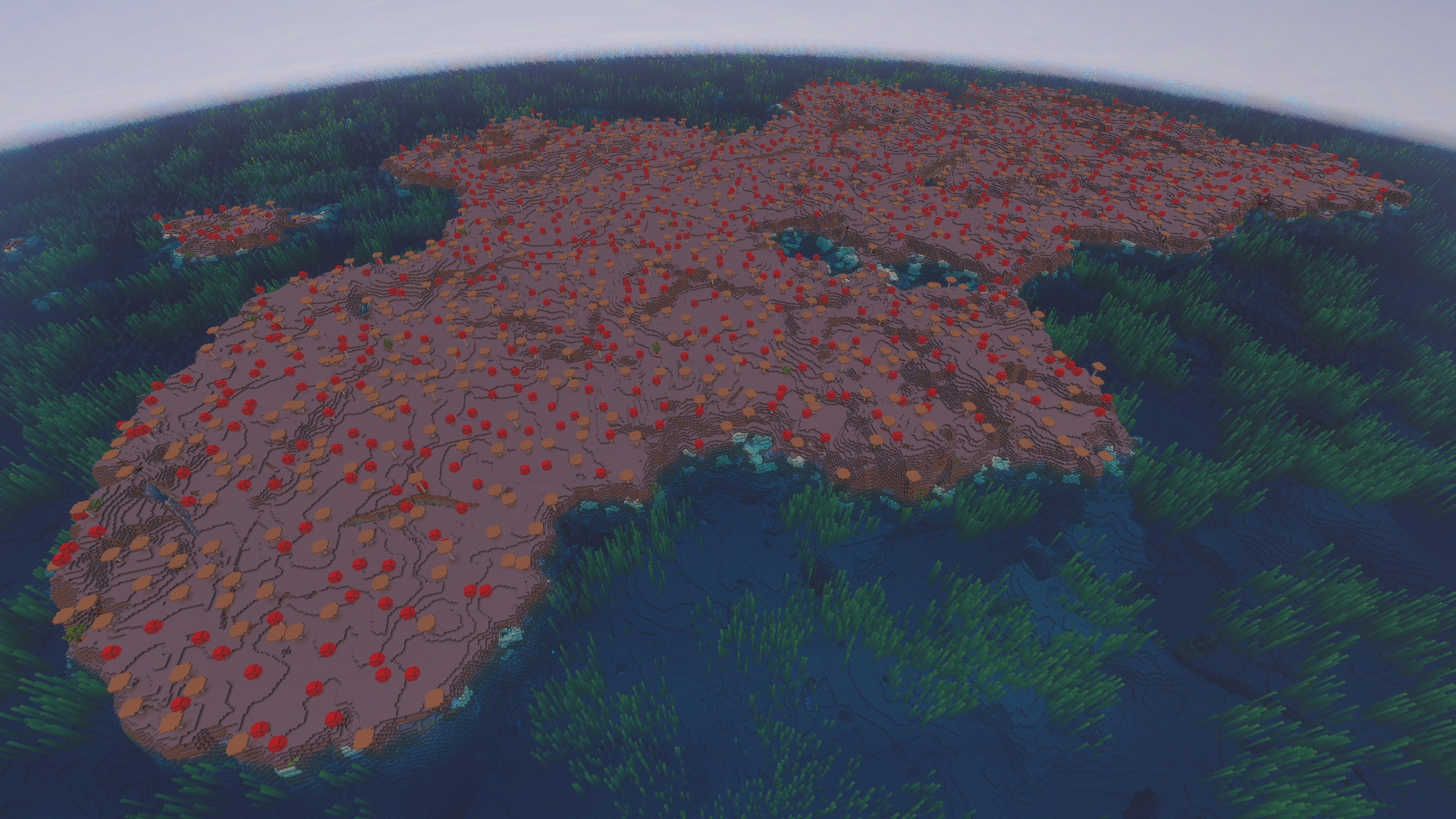
Mushroom Fields (the mushroom island biome) is one of the safest and strangest places to build in Minecraft. Because hostile mobs will not naturally spawn on mycelium, an island of the stuff is effectively a mob-free home base surrounded by ocean, complete with giant mushrooms and the passive, milk-and-stew-giving mooshrooms found nowhere else. The trade-off is rarity: mushroom islands are among the hardest biomes to stumble across, which is exactly why a good seed is worth having.
The seeds below are community-reported for the Minecraft 1.21.x era (the “26.2” label is a marketing/version tag on top of that). We have not personally tested every one, so treat the coordinates as approximate. Minecraft world generation can change between updates and differs between Java and Bedrock, so a seed that lands a mushroom island in one spot may shift it in another. The safe move: load the seed on a copy of your world first, confirm the island is where you expect, and only then commit to it. If you want to explore these worlds with friends, you can play your favourite seed with friends on a Minecraft server.
How to Use a Seed
Entering a seed takes a few seconds. When you click Create New World, open More World Options on Java Edition (or scroll to the Seed field under World settings on Bedrock), then type or paste the exact seed code into the Seed box before creating the world. Leave it blank for a random world.
Seed codes can be positive or negative numbers — include the minus sign exactly as written, because -8936702305531883130 and 8936702305531883130 are completely different worlds. Non-numeric text seeds get hashed into a number, but the numeric codes here should be entered exactly as shown.
To find the seed of a world you are already playing, run the /seed command in chat. You will need cheats enabled, or you can open the world to LAN with cheats on to run it once. On Bedrock the seed is also displayed in world settings under the Game screen. For more commands, see our Minecraft commands list.
Best Mushroom Island Seeds at a Glance
| Seed | Edition | Version | What’s at Spawn |
|---|---|---|---|
3903589 | Java | 1.21 | Small jungle spawn; mushroom island south across the Lukewarm Ocean |
3903589 | Bedrock | 1.21.0 | Jungle with parrots, sheep and melons; mushroom island south |
3768965590915631201 | Java & Bedrock | 1.21.4 | Forest spawn with easy starter resources; island nearby |
1501813564714336673 | Java & Bedrock | 1.21.4 | Mushroom island in a Frozen Ocean dotted with icebergs |
-8936702305531883130 | Java & Bedrock | 1.21 | Cold-ocean island roughly 500 blocks from spawn |
-1348008547075949990 | Bedrock | 1.21 | Four mushroom islands clustered in a Lukewarm Ocean |
2842901415727422438 | Bedrock | 1.21 | Long, stretched-out mushroom island in the ocean |
3626865858344280187 | Java & Bedrock | 1.21.2 | Mushroom island bordered by a Warm Ocean and coral reef |
5374691412471917055 | Java & Bedrock | 1.21 | Mushroom island with a central ravine for instant mining |
-6769744659830011552 | Java & Bedrock | 1.21 | Mushroom island in a Frozen Ocean right next to spawn |
Seed 3903589 — Jungle Spawn, Mushroom Island South (Java & Bedrock)
This is the clearest example of why edition matters. On Java (1.21), seed 3903589 drops you into a small jungle biome. Travel south across the Lukewarm Ocean and you reach a rare mushroom island with mooshrooms, with a Warm Ocean coral reef sitting right next to it for a splash of colour. There is also a ruined portal at (87, 63, -255) if you want an early Nether route.
On Bedrock (1.21.0) the same code generates a different world: you spawn in a jungle with parrots, sheep and melons, and the mushroom island lies south across the Lukewarm Ocean at (-20, 70, 28). There is buried treasure to dig up at (72, 57, -232). Same number, two very different adventures.
Frozen-Ocean Islands: 1501813564714336673 and -6769744659830011552
If you love the look of pink-and-red mycelium against snow and ice, two seeds deliver. Seed 1501813564714336673 (Java & Bedrock, 1.21.4) places a mushroom island in a Frozen Ocean dotted with icebergs near 481, 68 — a striking snow-and-mycelium contrast. Prefer a shorter trip? Seed -6769744659830011552 (Java & Bedrock, 1.21) puts a mushroom island in the centre of a Frozen Ocean right next to spawn, near -60, -219, so you can be settled on safe ground within minutes.
Multi-Island and Feature-Rich Picks
For a spread-out base, Bedrock seed -1348008547075949990 (1.21) has four separate mushroom islands clustered in a Lukewarm Ocean near 343, -262 — ideal for a multi-island build with bridges between them. Bedrock seed 2842901415727422438 (1.21) instead offers one long, stretched-out mushroom island in the ocean near -537, 327, giving you a lot of usable mycelium in a single landmass.
Two seeds bake in extra features. Seed 3626865858344280187 (Java & Bedrock, 1.21.2) surrounds its island with a Warm Ocean and patches of coral reef near -230, 128, for colourful underwater surroundings. Seed 5374691412471917055 (Java & Bedrock, 1.21) has a central ravine cutting straight through the island near -10, -200, giving you instant cave and mining access without leaving the safety of the biome.
Simple Starts: 3768965590915631201 and -8936702305531883130
Want an easy launchpad? Seed 3768965590915631201 (Java & Bedrock, 1.21.4) spawns you in a forest with easy starter resources — wood, dirt and seeds — and a mushroom island reachable near -261, -232. Seed -8936702305531883130 (Java & Bedrock, 1.21) sits its island in a cold ocean roughly 500 blocks from spawn near -186, -122, a short sail once you have gathered a boat and a few supplies.
Java vs Bedrock Seeds
This is the single most important thing to understand about seeds. The same seed code generates a different world on Java Edition versus Bedrock Edition, because the two editions use different world-generation algorithms. Spawn point, biome layout, structures and the mushroom island’s coordinates will not match between editions. Seed 3903589 above proves it — different spawn and different island coordinates on each edition.
Always use a seed on the edition it was reported for (noted per seed above), and remember that coordinates can still shift slightly between game versions and updates. If you are specifically on the pocket/console/Windows family, our best Minecraft Bedrock seeds guide focuses on Bedrock-verified worlds.
Frequently Asked Questions
Why don’t monsters spawn on mushroom islands?
The biome is covered in mycelium, and hostile mobs will not naturally spawn on it regardless of light level. That makes a mushroom island one of the safest natural biomes for a base — though mobs can still wander over from nearby land or spawn in dark caves beneath the island.
Are these seeds tested for version 26.2?
No — these are community-reported for the 1.21.x era (1.21, 1.21.0, 1.21.2, 1.21.4). Seeds cannot be validated without loading the world in-game, and generation can drift between versions. Treat every coordinate as approximate and confirm it in your target version before building.
How do I find the coordinates once I’m in the world?
On Java, press F3 to open the debug screen and read your XYZ position. On Bedrock, enable Show Coordinates in world settings. Then head toward the coordinates listed for your seed — the middle number (Y) is height, so the X and Z values are what you navigate by.
Can I use these seeds on a multiplayer server?
Yes. Set the seed in your server configuration before the world generates for the first time, matching the edition the seed was reported for. From there you can build a mycelium base together. Our Minecraft server hosting makes it easy to spin one up.
Where can I find other kinds of seeds?
Browse our wider collection: the best Minecraft seeds hub, plus focused guides for village seeds, woodland mansion seeds, cherry grove seeds, ancient city seeds and speedrun seeds. Planning to gear up on your new island? Our Minecraft enchantments list covers what to prioritise.
Ready to play?
Run your own Minecraft server with XGamingServer
Spin up an always-on Minecraft server your friends can join in minutes — no port-forwarding, no tech headaches.






