If your Garry’s Mod server is missing from the public server browser, ranking near the bottom, or behaving strangely with the master server list, the most common cause is a missing GSLT. A GSLT (Game Server Login Token) is a Steam Game Server Account login token that uniquely identifies your public, anonymously-hosted GMod server to Steam. Without one, Valve applies a severe server-list ranking penalty, and your server may not appear properly in the public browser at all. This guide walks through exactly what a GSLT is, how to generate one with the correct App ID, and how to apply it to your server, with the precise commands and values you need.
What Is a GSLT and Why Your GMod Server Needs One
A GSLT is a token tied to your Steam account that authenticates an anonymous game server with Steam’s backend. When a dedicated server logs into Steam anonymously (which is how virtually every public GMod server runs), Steam wants a way to associate that server with a real, accountable owner. The token provides that link.
The practical consequences of running without a token are significant:
- Server-list ranking penalty: Tokenless servers are pushed far down the public server browser, drastically reducing the players who can find and join you.
- Visibility problems: Your server may not appear properly in the public browser, even when it is online and reachable.
- No accountability link: Steam cannot associate the server with your account, which is increasingly important as Valve tightens server-list policies.
The single most important rule to internalize before you start: each server instance needs its own unique token. You cannot share one token across multiple GMod servers. If you run a sandbox server, a DarkRP server, and a TTT server, that is three separate tokens. Reusing a token across servers can cause both servers to be flagged or rejected by Steam.
The Critical Number: App ID 4000 (Not 4020)
This is where most people get tripped up, so we will address it head-on. Garry’s Mod involves two different App IDs, and using the wrong one when creating your GSLT will produce a token that does not work.
| Item | App ID | Where it’s used |
|---|---|---|
| Garry’s Mod (the game) | 4000 | GSLT “App ID of the base game” field |
| GMod Dedicated Server (tool) | 4020 | SteamCMD download (+app_update 4020 validate) |
When you create the token, the “App ID of the base game” field must always be set to 4000. As the official Facepunch documentation states, the first field should always be set to 4000 for Garry’s Mod. The 4020 value is only used by SteamCMD when you download the dedicated server files. Do not confuse the two: 4000 for the token, 4020 for the download.
Step-by-Step: Creating Your GSLT
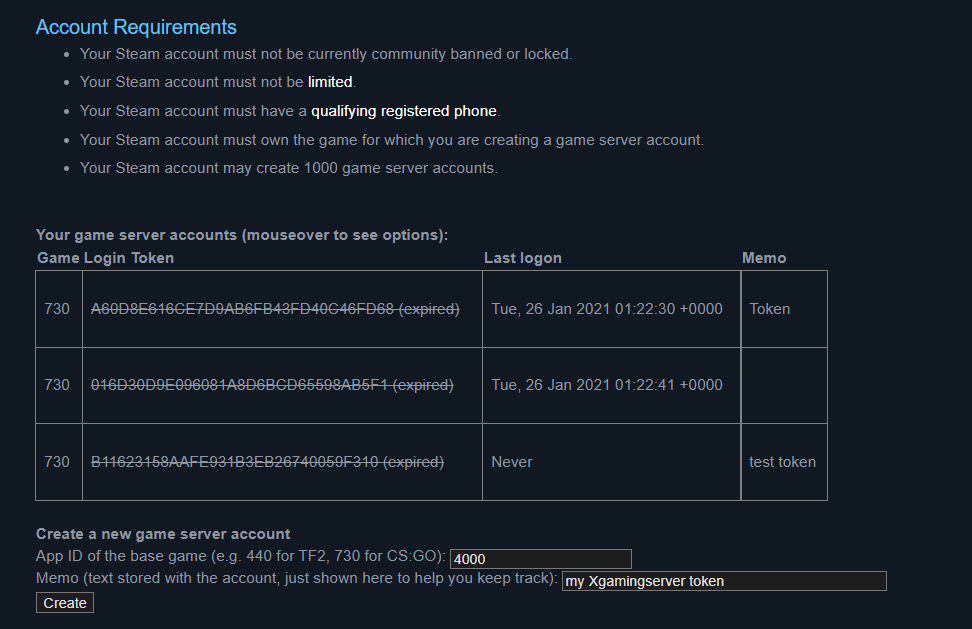
Step 1 — Go to the Steam Game Server Accounts page
Open your browser and navigate to the official Steam developer page for managing game server accounts:
https://steamcommunity.com/dev/managegameserversLog in with the Steam account you want to own these tokens. It is worth using an account you control long-term, because tokens are tied to it and can be regenerated or revoked from this same page later.
Step 2 — Enter App ID 4000 and a memo
On the page you will see a field labeled “App ID of the base game.” Enter:
App ID of the base game: 4000There is also a memo/comment field. Use it to label what the token is for, for example “GMod Sandbox – main server” or “DarkRP box 2.” This memo is invaluable once you have several tokens, because it is the only way to tell them apart at a glance. Click Create.
Step 3 — Copy your login token
Steam generates a long alphanumeric string, that is your GSLT. Copy it somewhere safe immediately. Treat it like a password: anyone with the token can run a server under your account’s identity. Do not paste it into public Discord channels, Workshop configs, or Git repositories.
If you run multiple servers, repeat Steps 2 and 3 once per server. Each gets its own unique token, all created with App ID 4000, each with a distinct memo.
Applying the GSLT to Your Server
Once you have the token, you apply it to GMod using sv_setsteamaccount. There are two common ways to do this, depending on how your server is launched.
Method 1 — Launch parameter (recommended)
Add the token to your server’s startup command line using the +sv_setsteamaccount launch parameter:
+sv_setsteamaccount YOURLOGINTOKENHERESlotted into a full SRCDS launch line, it looks like this:
srcds -console -game garrysmod +gamemode sandbox +map gm_construct +maxplayers 20 +sv_setsteamaccount YOURLOGINTOKENHEREThis is the preferred approach because the token is applied at the earliest possible moment in the boot process, before the server attempts to log into Steam. On most managed hosting panels, you will find a dedicated startup field for this, and many control panels expose a labeled “GSLT” or “Steam Account Token” box that drops the value into this exact parameter for you.
Method 2 — Server config
Alternatively, you can place the convar in your server configuration. GMod auto-executes garrysmod/cfg/server.cfg on every start. The convar form drops the leading +:
sv_setsteamaccount YOURLOGINTOKENHEREIn general the launch-parameter method is more reliable for the Steam login handshake, so if you have the choice, prefer Method 1. Use the config approach only if your environment makes editing the launch line awkward.
Verifying the Token Is Working
After applying the token and restarting, confirm it took effect:
- Check the server console at startup. When the token is accepted, the server logs into Steam with the GSLT identity rather than as a plain anonymous server. Watch the boot log for the Steam login lines and confirm there are no token-rejection warnings.
- Search the public server browser. Once the server has been up for a few minutes, it should appear in the GMod community server list at its expected ranking rather than buried at the bottom.
- Confirm the token status on Steam. Back on the
managegameserverspage, an in-use token shows as active and associated with your account.
If the server still will not appear, the usual culprits are a token created under 4020 instead of 4000, a token copied with a stray space or truncated character, or the same token being reused on two servers at once. Regenerate from the managegameservers page if in doubt.
Where GSLT Fits in Your Server Setup
The GSLT is one piece of a properly configured GMod dedicated server. It belongs alongside the other startup essentials. Here is how the core launch parameters relate to one another:
| Parameter / convar | Purpose | Example value |
|---|---|---|
+sv_setsteamaccount | Applies your GSLT | YOURLOGINTOKENHERE |
+gamemode | Gamemode to run | sandbox, darkrp, terrortown |
+map | Startup map | gm_construct |
+maxplayers | Player slot count | 20 |
+host_workshop_collection | Workshop content collection | |
-console | Forces server console | (flag, no value) |
The default GMod example map is gm_construct running the sandbox gamemode, which is the configuration the Facepunch dedicated-server example ships with. You can change the map live from the console with map , for example map gm_flatgrass. For more on tuning your launch line, the guide to changing your default map walks through the map and gamemode parameters in detail.
Security and Token Hygiene
Because a GSLT is tied to your Steam identity, treat it with the same care you give your RCON password. A few rules keep you out of trouble:
- Never publish a token. Keep it out of public configs, Workshop uploads, screenshots, and Git history.
- Regenerate if exposed. If a token leaks, delete it on the managegameservers page and create a fresh one. Then update the launch line.
- One token per server, always. This bears repeating because it is the most common mistake after the App-ID error.
- Label every token. The memo field is your inventory system once you scale past one or two servers.
While you are hardening your setup, it is a good moment to lock down remote administration too. Setting a strong rcon_password in server.cfg and restricting the RCON port is covered in the companion RCON configuration guide. And if you plan to run admin tooling that persists data, see how to add MySQLoo to your GMod server so addons like DarkRP can connect to a database.
Hosting That Handles GSLT for You
On a self-managed box you edit the launch line by hand. On a managed panel, the workflow is friendlier: most provide a labeled field where you paste the token, and the panel injects +sv_setsteamaccount automatically on every start. If you would rather skip the SteamCMD and command-line work entirely, our managed Garry’s Mod hosting ships with a startup token field, instant gamemode switching, and Workshop collection support built in. You can also browse the full Garry’s Mod documentation for panel-specific walkthroughs of every setting referenced here.
Frequently Asked Questions
What App ID do I use to create a GMod GSLT?
Use 4000 in the “App ID of the base game” field. This is the Garry’s Mod game ID. Do not use 4020, that is the dedicated server tool ID used only for SteamCMD downloads. A token created under the wrong App ID will not work.
Where do I create a GSLT?
Go to https://steamcommunity.com/dev/managegameservers and log in with your Steam account. Enter App ID 4000, add a memo, and click Create to generate the token.
How do I apply the token to my server?
Add +sv_setsteamaccount YOURLOGINTOKENHERE to your launch command line, or place sv_setsteamaccount YOURLOGINTOKENHERE in garrysmod/cfg/server.cfg. The launch-parameter method is generally more reliable for the Steam login.
Can I use one GSLT for multiple servers?
No. Each server instance needs its own unique token. Reusing a single token across multiple servers can cause Steam to flag or reject them. Create a separate token (all under App ID 4000) for every server you run.
What happens if I don’t use a GSLT?
Your server suffers a severe Steam server-list ranking penalty and may not appear properly in the public server browser, which means far fewer players can find and join it. A token is effectively mandatory for any public GMod server.
What else should I configure after the GSLT?
Common next steps are setting your gamemode and map, securing RCON, and setting up moderation. Many admins also tighten gameplay by setting sbox_noclip 0 to block player noclip and leaving sv_cheats at 0, granting abilities through an admin mod instead. See the disable-noclip guide for that part of the setup.
Ready to play?
Run your own Garry's Mod server with XGamingServer
Spin up an always-on Garry's Mod server your friends can join in minutes — no port-forwarding, no tech headaches.