
Want to enable Minecraft crossplay so Java and Bedrock players can join the same server? With XGamingServer, setting it up is incredibly easy. Thanks to our built-in plugin installer, you can get crossplay working in just a few clicks — no technical skills needed.
This guide will walk you through everything you need to know to enable Minecraft crossplay using Geyser and Floodgate plugins.
How to Enable Minecraft Crossplay on XGamingServer
1. Log into Your XGamingServer Panel
Go to panel.xgamingserver.com and access your Minecraft server dashboard.
2. Head to the “Plugins” Tab
Click on the Plugins tab from the top navigation bar.
3. Search for “Geyser”
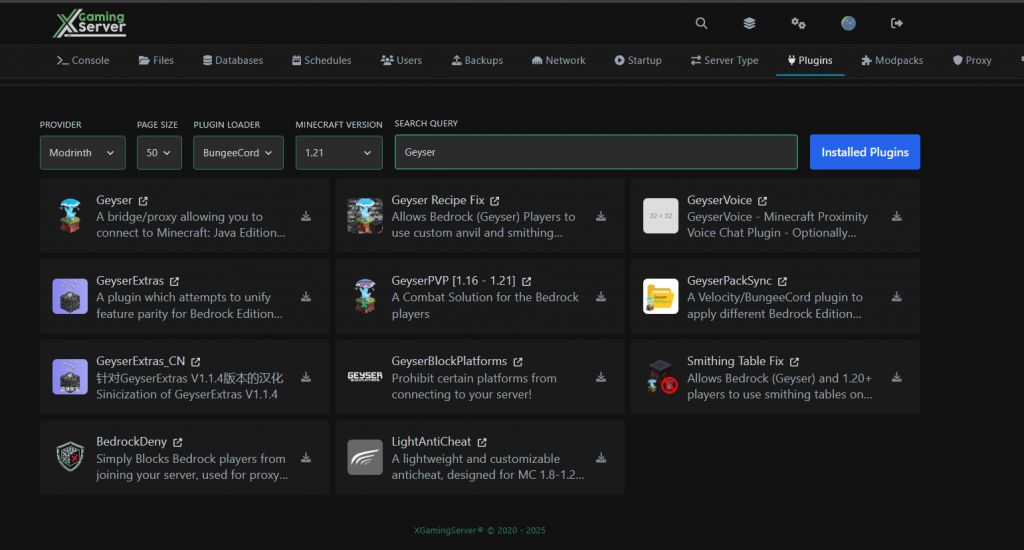
In the search box, type Geyser. You’ll see:
- ✅ Geyser – the main plugin to enable Minecraft crossplay
- ✅ Floodgate – optional, but allows Bedrock users to join without a Java account
- 🛠 Extra tools like GeyserVoice, GeyserPackSync, and GeyserExtras
4. Install Geyser and Floodgate
Click the download icon on both plugins. This installs them directly — no need to upload any files manually.
5. Restart Your Server
After installing, restart the server to activate the plugins and generate config files.
💡 Tip: For maximum compatibility, your server type should be Paper, Spigot, or Purpur.


Configure Geyser for Advanced Crossplay (Optional)
To customize your setup (optional):
- Save and restart your server
- Open the
plugins/Geyser/config.ymlfile - Set
auth-type: floodgateto allow Bedrock logins without Java accounts
How Bedrock Players Can Join
Once Minecraft crossplay is enabled, Bedrock players can connect by:
- Opening Minecraft Bedrock
- Going to Play > Servers > Add Server
- Entering your server IP and port:
- Port:
19132(default Bedrock port)
- Port:
Extra Plugins for a Better Minecraft Crossplay Experience
You can also install optional Geyser plugins like:
- 🔊 GeyserVoice – Proximity voice chat support
- 🎨 GeyserPackSync – Sync Bedrock resource packs
- ⚔️ GeyserPvP – Combat fixes for Bedrock clients
- 🛠️ Smithing Table Fix – Compatibility with Java 1.20+ mechanics
All available via the Plugin Installer!
Need Help?
Stuck or need help customizing your setup? Our support team is always ready on live chat or through the panel’s ticket system.
Start Hosting with Crossplay Support
With XGamingServer, enabling Minecraft crossplay is built-in and beginner-friendly. Don’t let different editions stop you from playing together!
- One-click MC plugin installer
- Crossplay-ready setup
- Lag-free gameplay
- 24/7 support
- DDoS protection
👉 Explore Minecraft Hosting Plans
Free Minecraft Tools
Speed up your server with our free Minecraft tools:
Ready to play?
Run your own Minecraft server with XGamingServer
Spin up an always-on Minecraft server your friends can join in minutes — no port-forwarding, no tech headaches.






