This guide will show you how to change the map on your ARK: Survival Evolved server.
Changing the Map
Chanching the map on your ARK: Surival Evolved server is very easy! All you need to do is open your XGaming controll panel and switch to the Startup tab.

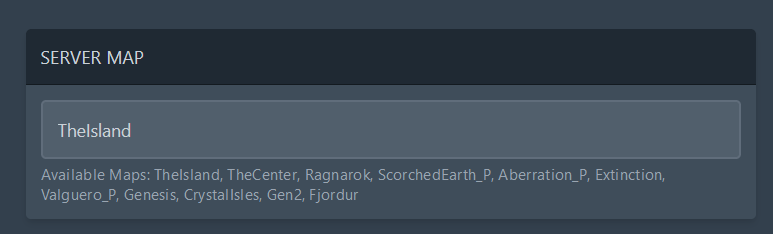
There you just need to change the SERVER MAP variable to one of the following available maps:
- TheIsland
- TheCenter
- Ragnarok
- ScorchedEarth_P
- Aberration_P
- Extinction, Valguero_P
- Genesis
- CrystalIsles
- Gen2
- Fjordur
If you are not sure which map to choose, you can check out how each map looks like here.
Don’t forget to restart your server to apply the changes. You can do this in the Console tab.

Free ARK Tools
Speed up your server with our free ARK tools:
Ready to play?
Run your own ARK server with XGamingServer
Spin up an always-on ARK server your friends can join in minutes — no port-forwarding, no tech headaches.
99.9%Uptime SLA
< 5 minInstant setup
24/7Human support
DDoSProtected
Instant setup
Your server is live in minutes with a one-click control panel.
Mods & plugins
Install mods, plugins and workshop content in a few clicks.
DDoS protected
Enterprise DDoS mitigation keeps your server online 24/7.
Low-latency hardware
Premium CPUs & NVMe SSDs for lag-free multiplayer.
Free backups
Automatic backups so your world is never lost.
Real human support
Gamers helping gamers — 24/7, no bots, no scripts.