

In this article we will teach you how to change your Minecraft server skin!
In this article we will be using “ChangeSkinX“, If you don’t know how to use plugins on your Minecraft server, then please take a look at this article “How to install plugins on your Minecraft server“
How to use the plugin?
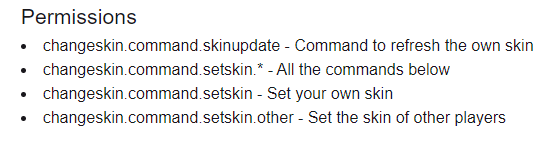
Once you have installed the plugin, ensure that you are either an operator or have the necessary permissions to access the plugin’s commands. After that, you can begin utilizing the commands listed below

And here are the necessary permissions to be able to use these commands in case you weren’t an operator
If you need any help with your service don’t hesitate to contact us through our support tickets at https://billing.xgamingserver.com/submitticket.php
Free Minecraft Tools
Speed up your server with our free Minecraft tools:
Ready to play?
Run your own Minecraft server with XGamingServer
Spin up an always-on Minecraft server your friends can join in minutes — no port-forwarding, no tech headaches.






