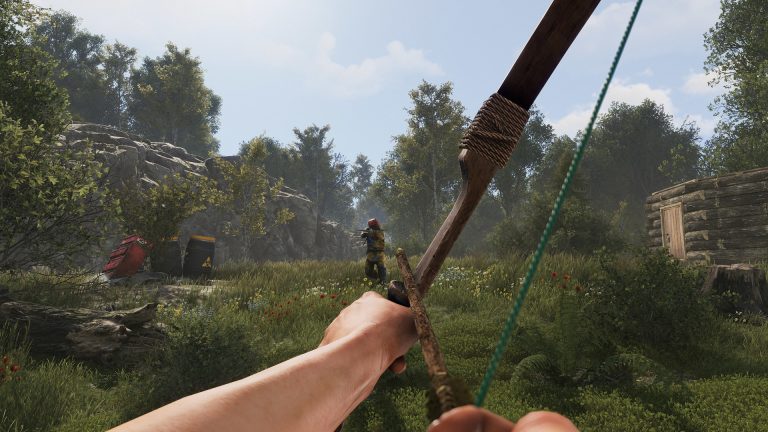
The Built Different update landed on the standard monthly force-wipe slot, and it is one of the heavier patches Rust has shipped in a while: a Unity 6 engine upgrade, a full player-model and animation rebuild, new weapons and armor, and a brand-new AI navmesh system. For players that means a fresh start. For server admins it means a mandatory wipe, a framework reinstall, and a handful of new behaviors you need to understand before your first-online rush hits. This guide breaks down exactly what changed, what it means for your server, and the verified facts you can act on today, with anything still unconfirmed clearly flagged so you do not push a broken config on wipe day.
When did Built Different drop, and was there a forced wipe?
Built Different released on Thursday, June 4, 2026 at 2 PM EDT, on Rust’s regular monthly force-wipe schedule. The answer to the question every admin asks first is yes: this was a mandatory force wipe, and there was no partial-wipe option. Crucially, it reset two separate things: the map save (every structure, deployable, and placed entity in the world) and every player’s blueprint data. That blueprint reset is the part that stings for returning players, because it means everyone re-learns the tech tree from scratch.
This map-versus-blueprint distinction matters beyond force-wipe day. In normal operation, changing your world (seed, worldsize, level, or level URL) wipes the world and its entities because the saved structures no longer line up with valid terrain, but it does not automatically reset player blueprints, which live in a separate save. Built Different was a “both” wipe precisely because Facepunch chose to clear the blueprint save too. If you run your own custom wipe cadence between forced wipes, keep that separation in mind, and see our deeper walkthrough on how to change the map on your Rust server for the entity-versus-blueprint mechanics.
What Built Different actually changed
The confirmed content of the update (corroborated independently of our own coverage) is substantial:
- Unity 6 engine upgrade — the foundation under the whole patch, and the source of the performance gains discussed below.
- M16A2 assault rifle — a new burst-capable rifle, reported to be loot-exclusive (not craftable from a workbench).
- Ballistic Armor set — Ballistic Helmet, Vest, and Leg Armor pieces.
- Full player-model and animation rebuild, plus a UI overhaul with new yellow accents.
- New cosmetics — ponytail and bun hairstyles, body hair, and BDU shirt/pants.
- A new Navmesh system for AI pathfinding — and this is the one admins must note: it is disabled by default.
The navmesh is the single most consequential gameplay change for server operators. When enabled, it gives NPCs (animals and scientists) smarter, threaded pathfinding. The catch, also reported: with the new navmesh on, “animals and scientists can now path directly into player bases.” That is a meaningful change to how raids and roaming AI behave, so test it on a staging server before flipping it on a live high-pop instance.
Performance: more headroom, no extra RAM
The confirmed direction on performance is genuinely good news: Built Different delivers lower CPU load with no increase in RAM requirements. For high-population servers that have been bumping against single-core limits, that is real headroom rather than a marketing line.
To understand why CPU is the lever that matters, remember Rust’s architecture: it runs on Unity and the server is mostly single-threaded. That means performance is dominated by single-core CPU clock speed, not by core count. Load scales with entity count, worldsize, player count, AI activity, plugin overhead, and world saves. A Unity-version bump that trims per-frame CPU work is exactly the kind of change that helps a single-threaded simulation the most.
The verified performance convars you should know are stable across this update:
fps.limit— caps server FPS. It does not add FPS; it prevents wasted resources. Facepunch has stated a server can be capped at 30 FPS with players noticing no difference; a common range is 30–60, and going above 256 is wasteful.server.tickrate— read at startup only; the ideal range is 30–60. It mainly governs RCON updates and inbound network packet processing. Changing it live has no effect.entitybatchsize— number of entities loaded per frame.- Garbage collection:
gc.interval(time between GC cycles),gc.buffercount(number of GC buffers), andgc.unloadingdelay(delay between unloading and deleting objects).
The biggest single lever for restoring performance on a long-running server is still the wipe itself: clearing accumulated structures and deployables drops the entity count that taxes the single-threaded sim. Plugin overhead is also real and worth auditing. For a full optimization workflow, see how do we improve Rust server performance.
Oxide and Carbon: the timing trap on wipe day
This is the part that catches admins off guard every single update, and it is fully confirmed behavior: a Facepunch update overwrites your Oxide and Carbon files. After every wipe or update, you must reinstall the modding framework before any plugins will load. Your plugins and configs are not gone, but the framework that loads them is, so a modded server will boot vanilla until you reinstall.
There are two frameworks in the ecosystem, and the choice affects how fast you are back online:
- Oxide / uMod — the long-established framework with the largest plugin library (1,400+ plugins on uMod). Traditional chat-command workflow.
- Carbon — a modern framework. The official Rust wiki describes it as “a modern modding framework for the game Rust responsible for handling background operations and running custom plugins and extensions with maximum performance.” It offers “seamless migration from Oxide with identical folder structure and automatic data migration tools” and “uses Harmony and does not require any additional patches to run existing Oxide plugins.”
Community sources report Carbon at roughly 99% Oxide-plugin compatibility, with dynamic hook loading (only the hooks your plugins actually call are loaded, which is reported to mean higher FPS, lower RAM, and a 30–40% faster boot). Treat those percentages as reported rather than Facepunch-official. The practically useful fact: on force-wipe day, Carbon is typically patched fastest, often within hours. If your business depends on capturing the first-online rush the moment the wipe lands, that turnaround speed is a real consideration. Either way, reinstall the framework first, then confirm your plugins load.
Where your files live after a reinstall
Knowing the folder layout speeds up your post-update recovery. For Oxide, plugins go in oxide/plugins/ as .cs files, configs in oxide/config/ as .json, data in oxide/data/, and logs in oxide/logs/. Carbon, per the wiki, uses an identical folder structure to Oxide (so carbon/plugins/, carbon/configs/, and so on). Because the structure matches, migrating between the two is straightforward, and Carbon ships data-migration tooling to help.
The new convars: reported, not yet confirmed
This section needs an honest caveat. A set of new server-admin convars has been associated with Built Different, but they currently appear in only one source and were not corroborated by independent patch-notes coverage. Do not paste these into a production server.cfg as definitive Facepunch convars until you have confirmed the exact strings against the official patch notes. Treat everything below as reported:
| Reported convar / flag | What it reportedly does |
|---|---|
weather.rain_grace_period | Delays post-wipe rain. |
global.teleport2entityid | Admin teleport to a UGC entity. |
antihack.parenthistory | Better hit validation on moving parented objects. |
pool.usemutexpool 1 | Reverts to legacy object pooling. |
UsePlayerUpdateJobs 3 | Reported ~0.6 ms/frame saving on busy servers. |
-useNewNavmesh (launch flag) | Enables the new AI navmesh: smarter NPC pathing and threaded obstacle handling — but animals and scientists can then path directly into player bases. |
The navmesh launch flag is the one most worth verifying and testing, because it directly changes AI behavior near bases. The rest are quality-of-life and performance tweaks. Until the official commit or patch notes confirm them, label any reference to these in your own documentation as “reported.”
Post-wipe checklist: getting your server back online
Here is the practical sequence for any force-wipe update, including this one. Your core launch parameters and ports do not change with Built Different, so you can rely on the standard setup. The canonical convars and their defaults:
| Convar | Default / Example | Notes |
|---|---|---|
server.port | 28015 | Game traffic. This port is UDP. |
rcon.port | 28016 | Default is equal to server.port — i.e. server.port + 1 in practice. |
rcon.password | (none) | Must be set or RCON is unusable. Change this value. |
rcon.web | 1 | Value 1 = WebSocket/WebRCON mode (suggested); 0 = legacy mode. |
server.seed | any integer 0–2147483647 | Defines the procedural world. |
server.worldsize | 4000 (wiki example) | Use 1000 to 6000. |
server.maxplayers | e.g. 10 | Player slot cap. |
A standard launch line looks like this (verbatim structure from the official wiki):
RustDedicated.exe -batchmode +server.port 28015 +server.level "Procedural Map"
+server.seed 1234 +server.worldsize 4000 +server.maxplayers 10
+server.hostname "Name of Server" +server.description "Description"
The wiki’s own advice is worth repeating: “Set only necessities like ports or rcon on the command line. If you want to change a bunch of variables a good option is creating a server.cfg file.” The server reads server.cfg at startup and it takes priority over command-line settings. One reminder that trips people up: server.* convars are set via the command line or server.cfg, not via in-game chat.
Your wipe-day checklist, in order:
- Update the Rust dedicated server files (the wipe and new build).
- Reinstall Oxide or Carbon — the update overwrote it; plugins will not load until you do.
- Confirm your plugins loaded and re-check their configs (a fresh framework can regenerate defaults).
- Decide on your world (seed/worldsize) and apply it via
server.cfg. - Verify WebRCON connectivity using
rcon.web 1, yourrcon.port, and your password. - Decide whether to enable the new navmesh — test on staging first.
For the full RCON setup, including the official WebRCON web client at facepunch.github.io/webrcon/, see our companion guide on Rust RCON server console commands. If you would rather not handle the framework reinstall and update timing yourself, a managed dedicated Rust server handles the build update and lets you focus on configuring the new content. Step-by-step setup walkthroughs live in our Rust hosting documentation.
Verifying who connected after the wipe
After a force wipe, watching the first-online rush is part of the job. The verified commands for listing players are status, players, playerlist, and users. The most useful is status, which prints a server header followed by one row per connected player with columns for ID (SteamID64), Name, Ping, Connected (seconds), Addr, Owner (auth level), Violation, and Kicks. For web tooling, playerlist returns a JSON-style array of hashes with per-player keys including SteamID, DisplayName, Ping, ConnectedSeconds, ViolationLevel, and Health. The full breakdown is in how to see who is on your Rust server.
Frequently asked questions
Does the Built Different update force a wipe on my Rust server?
Yes. Built Different released on June 4, 2026 on Rust’s monthly force-wipe slot and triggered a mandatory full wipe. It reset both the map save (all structures, deployables, and placed entities) and every player’s blueprint data. There is no partial-wipe option for a forced wipe — both saves were cleared, so players started from scratch on both their base and their learned tech tree.
Do I need to reinstall Oxide or Carbon after Built Different?
Yes. Every Facepunch update overwrites the Oxide and Carbon framework files, so after Built Different (and after any wipe or update) you must reinstall your modding framework before plugins will load. Your plugins and configs in oxide/plugins/ and oxide/config/ (or the identical Carbon paths) remain, but the loader is gone until you reinstall it. Carbon is typically patched within hours of force-wipe day, which matters if you want to be online for the first-player rush.
What are the new Built Different server convars?
Several convars have been reported in connection with the update — including weather.rain_grace_period, global.teleport2entityid, antihack.parenthistory, pool.usemutexpool 1, UsePlayerUpdateJobs 3, and the -useNewNavmesh launch flag — but these currently come from a single source and were not corroborated by independent patch-notes coverage. Verify the exact strings against the official patch notes before putting them in a live config. The navmesh flag is the most impactful, since it lets animals and scientists path directly into player bases.
Did Built Different improve server performance?
Yes, in the confirmed direction: the update delivers lower CPU load with no increase in RAM requirements, which gives high-population servers more headroom. Because Rust’s server is mostly single-threaded on Unity, single-core CPU clock speed is the limiting factor, so a Unity 6 engine upgrade that trims per-frame work helps the most. You still control performance with fps.limit (Facepunch says 30 FPS is fine), server.tickrate (ideal 30–60, startup-only), and regular wipes to keep entity count down.
Can I still change gather rates after the update?
Yes, and the method is unchanged: vanilla Rust has no built-in gather-rate convar, so you must install a plugin. The de facto standard is GatherManager, configured in oxide/config/GatherManager.json. Its command form is gather.rate across four types — dispenser, pickup, quarry, and survey — for example gather.rate dispenser Wood 10 for 10x wood. Just remember to reinstall your framework after the wipe before the plugin will load. Full details are in how to modify the gather rate on your Rust server.
How do I set admin permissions after reinstalling my framework?
Oxide and Carbon auto-create two default groups, admin and default, and use the node format pluginname.permission. Grant to a player or group with oxide.grant user or oxide.grant group admin coolplugin.use. Carbon accepts the same oxide.* commands and adds the o. short alias (e.g. o.grant). After a wipe-day framework reinstall, re-verify your groups with oxide.show groups. See how to set plugin permissions on your Rust server for the complete syntax.
The bottom line for admins
Built Different is a big patch, but the admin workload is predictable: it forced a full wipe of both map and blueprints, it overwrote your modding framework (so reinstall Oxide or Carbon first), and it brought real performance headroom with no extra RAM. The new AI navmesh is the headline behavioral change worth testing, and the reported convars should be confirmed against official patch notes before they touch a live config. Get the framework reinstalled, lock down your rcon.password, decide on your navmesh stance, and you will be ready for the first-online rush.
Free Rust Tools
Speed up your server with our free Rust tools:
Ready to play?
Run your own Rust server with XGamingServer
Spin up an always-on Rust server your friends can join in minutes — no port-forwarding, no tech headaches.